
Professional Search Engine Optimization (SEO) Services in Kenya
Rank Higher on Google, Increase Traffic, and Grow Your Business
Search Engine Optimization (SEO) is the foundation of online visibility. At Zanzz Technologies, we provide professional SEO services that help businesses rank higher on Google and other search engines, attract organic traffic, and convert visitors into customers. Our SEO strategies are designed to improve your website’s performance, visibility, and long-term digital growth.
We focus on both technical and content-driven SEO to ensure your website is fully optimized for search engines and user experience.

Professional Web & App-Based POS Systems for Businesses in Kenya
Manage Sales, Inventory, Products, Receipts, Customers, and Business Operations From One Powerful POS System
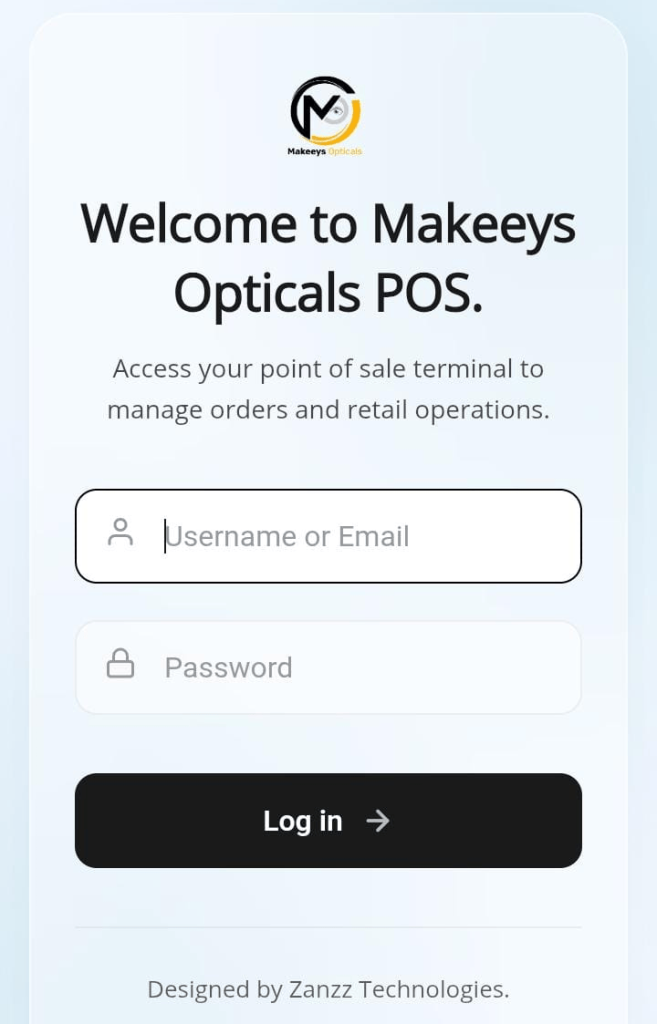
A modern Point of Sale (POS) system does much more than process payments. At Zanzz Technologies, we develop customized web-based and app-based POS systems designed to help businesses manage sales, products, inventory, customers, receipts, staff, and day-to-day operations from one centralized platform.
Our POS solutions are built for businesses that need a reliable system for recording transactions, searching products by SKU or barcode, managing stock, printing receipts, monitoring sales, and generating useful business reports.
Whether you operate a retail shop, supermarket, wholesale business, pharmacy, electronics store, clothing shop, hardware store, restaurant, distributor, or other sales-based business, we can develop a POS solution around your specific workflow.
Our POS Development Services
Web-Based POS Development
Mobile POS App Development
Barcode & QR Code Integration
SKU-Based Product Search
Product & Inventory Management
Receipt Printing
Cashier Management
Customer Management
Stock Management
Sales Reports
Dashboard & Business Analytics
User Roles & Permissions
Multi-Branch POS Systems
Payment Integration
Inventory & Sales Synchronization
Key Features of Our POS Systems
- Product management
- SKU management
- Barcode scanning
- QR code scanning
- Product search
- Product categories
- Stock management
- Inventory reports
- User permissions
- Admin dashboard
- Branch management
- Data management
- Responsive web interface
- Mobile compatibility
- Sales history
- Purchase records
- Discounts
- Tax configuration
- Payment recording
- Low-stock notifications
- Sales reports
- Inventory tracking
- Sales processing
- Receipt generation
- Receipt printing
- Cashier accounts
- Staff management
- Customer management
Key Features of Our POS Systems
Our custom POS systems combine sales management, inventory control, product tracking, staff management, reporting, and business automation into one powerful platform designed around your operations.
Product Management
Create, organize, update, and manage your complete product catalog, including product names, categories, prices, SKUs, quantities, and other important product information.
SKU Management
Assign and manage unique stock-keeping units to make products easier to identify, search, organize, sell, and track throughout your business.
Barcode & QR Scanning
Connect compatible barcode scanners and QR code readers to quickly identify products and reduce manual product entry during checkout.
Fast Product Search
Find products quickly using product names, SKUs, barcodes, categories, or other configured search fields for a smoother checkout experience.
Sales Processing
Process customer purchases efficiently with automated calculations, quantities, transaction recording, discounts, totals, and payment information.
Receipt Generation
Generate professional transaction receipts and connect compatible receipt printers to support faster and more organized checkout operations.
Inventory Tracking
Monitor product quantities and stock movement as sales are completed, helping your business maintain better control over available stock.
Low-Stock Monitoring
Identify products approaching their minimum stock levels so your team can make informed purchasing and restocking decisions.
Cashier Accounts
Create individual cashier accounts and track sales activity according to staff members, helping improve accountability and operational visibility.
User Roles & Permissions
Control what administrators, managers, cashiers, storekeepers, and other staff can access based on their responsibilities.
Customer Management
Maintain customer information and transaction records to support repeat purchases, customer accounts, loyalty programs, and personalized services.
Sales Reports
Access useful sales information through reports covering transactions, products, dates, cashiers, revenue, and other configured business metrics.
Business Dashboard
Get a centralized overview of important business information through an intuitive dashboard designed for management and administration.
Stock & Sales Synchronization
Connect sales activity with inventory data so product quantities can be updated as transactions are completed.
Multi-Branch Management
Manage multiple business locations from a centralized platform with branch-specific users, products, inventory, and sales information.
Payment Integration
Build payment functionality around supported payment platforms and business requirements for a more streamlined transaction process.
Responsive Interface
POS interfaces can be designed for computers, tablets, and compatible mobile devices, depending on the architecture selected for your business.
Custom Business Modules
Add specialized modules and workflows to support unique business requirements that may not be available in standard POS software.
Need a POS System Built Around Your Business?
Tell us what you sell, how your business operates, and the features you need. We can help plan a customized POS solution with product management, barcode scanning, inventory, sales, receipts, reporting, and other functionality tailored to your requirements.
Request Your POS Development Quote Today
Tell us what your business needs and let us design a POS solution around your products, sales process, inventory, staff, and business operations.
Tell us what your business needs and let us design a POS solution around your products, sales process, inventory, staff, and business operations.
Need a POS system for your shop, supermarket, pharmacy, restaurant, wholesale business, or other enterprise?
Let’s discuss your requirements and develop a solution that can support your day-to-day operations.
We typically reply within minutes.
Contact: +254713409839
Frequently Asked Questions
Have questions about POS software development, barcode scanning, inventory management, receipt printing, mobile applications, or integrations? Find answers to some of the most common questions below.
01 What is a POS system?
A Point of Sale (POS) system is software used to manage sales transactions and related business operations such as products, inventory, customers, payments, receipts, and reporting. A customized POS can bring several of these functions together in one centralized platform.
02 Can you develop a POS system for my specific business?
Yes. POS systems can be customized according to your business model, products, sales process, inventory requirements, staff roles, reporting needs, hardware, payment requirements, and integrations.
03 Can the POS system use a barcode scanner?
Yes. A compatible POS architecture can integrate barcode scanning functionality so products can be identified quickly during sales. Compatibility depends on the scanner hardware and the technical architecture of the POS system.
04 Can the POS system search products using SKU numbers?
Yes. SKU-based product search can be included so staff can quickly locate products using unique stock-keeping identifiers. The system can also be configured to search using product names, categories, barcodes, or other relevant product information.
05 Can the POS print receipts?
Yes. Receipt generation and printing can be incorporated into the POS system, subject to compatibility with the selected receipt printer and technical environment. Receipt layouts can also be configured according to the business requirements.
06 Can the POS work on a phone?
Yes. Depending on the requirements, we can develop mobile-compatible POS functionality or a dedicated mobile application. The most suitable approach depends on the business workflow, devices being used, connectivity requirements, and required POS functionality.
07 Can I have both a web POS and mobile app?
Yes. A POS solution can be designed with a web-based administration system and mobile interfaces where the business requires them. Different user interfaces can be connected to the same underlying business data and backend infrastructure.
08 Can the POS manage inventory?
Yes. Inventory functionality can include product records, stock quantities, SKU information, categories, stock movement, sales deductions, and low-stock monitoring. The exact inventory features can be customized around your business operations.
09 Can the POS support multiple branches?
Yes. Multi-branch functionality can be developed for businesses that operate multiple locations and require centralized management of branches, users, products, inventory, sales, and reports.
10 Can the POS integrate with payment systems?
Payment integrations can be developed depending on the required payment provider, API availability, technical requirements, and business needs. The integration approach can be discussed during the system planning stage.
11 Can you add features later?
Yes. A properly planned system can be developed with scalability in mind, allowing additional modules and functionality to be introduced as the business grows. Future features may include additional reports, branches, integrations, user roles, inventory functions, mobile applications, or other custom modules.
Have More Questions About Your POS Project?
Every business has different POS requirements. Talk to Zanzz Technologies about your products, sales process, inventory, barcode scanners, receipt printers, payment integrations, and other requirements, and let’s plan the right solution for your business.
